REST-API: Beispiele
Die Skripte nutzen die V3-Schnittstelle der REST-API; dort stehen Anmeldung, Berechtigungen und Best Practices.
Ein minimaler Client
Die folgenden Beispiele bauen alle auf diesem Client auf. Er kommt ohne zusätzliche Abhängigkeiten aus und zeigt Anmeldung, Paginierung und Fehlerbehandlung an einer Stelle.
Ruby
# frozen_string_literal: true

require 'json'
require 'net/http'
require 'uri'

# Minimal client for the Librario v3 REST API, using only the standard library.
#
# Every v3 request carries an OAuth 2.1 bearer token. The token is bound to a single audience —
# exactly "<base_url>/api/v3" — so a token minted for one Librario host is rejected by any other.
# See oauth_pkce_login.rb for how to obtain one.
#
#   client = LibrarioClient.new(
#     base_url: 'https://acme.mylibrar.io',
#     access_token: ENV.fetch('LIBRARIO_ACCESS_TOKEN')
#   )
#   client.whoami
class LibrarioClient
  # Raised on any non-2xx response. The API answers with { "error": { "code", "message" } }.
  class Error < StandardError
    attr_reader :status, :code

    def initialize(status, body)
      @status = status
      @code = body.dig('error', 'code')
      super("HTTP #{status} #{@code}: #{body.dig('error', 'message') || body}")
    end
  end

  def initialize(base_url:, access_token:)
    @base_url = base_url.to_s.chomp('/')
    @access_token = access_token
  end

  # The authenticated user. The cheapest way to check that a token works.
  def whoami = get('/users/me')

  # Filters are the flat query parameters of GET /publications: doi, isbn, issn, arxiv_id, pmid,
  # author, category, year, query (full text), ... The typed `identifiers` array is the *response*
  # shape; you still search by the flat parameter.
  def publications(**filters) = get('/publications', **filters)

  # Yields every publication matching the filters, page by page. List endpoints cap out at
  # 25 records per page.
  def each_publication(per_page: 25, **filters, &)
    return to_enum(:each_publication, per_page:, **filters) unless block_given?

    page = 1
    loop do
      records = publications(page:, per_page:, **filters).fetch('records')
      records.each(&)
      break if records.size < per_page

      page += 1
    end
  end

  def create_publication(attributes) = post('/publications', attributes)
  def publication(id) = get("/publications/#{id}")
  def delete_publication(id) = delete("/publications/#{id}")

  def users(**filters) = get('/users', **filters)
  def update_user(id, attributes) = patch("/users/#{id}", attributes)

  # Presigns a direct-to-S3 upload. Returns { "url", "fields" }; `fields["key"]` becomes the
  # asset's file id once the "cache/" prefix is stripped.
  def presign_asset(filename:, type:) = get('/assets/presign', filename:, type:)

  # Presigns a direct-to-S3 cover-image upload. Returns { "url", "fields" };
  # `fields["key"]` becomes the publication's cover id once the "cache/" prefix is
  # stripped. Set the resulting { id:, storage: "cache", metadata: } hash as `cover`
  # on a publication create/update to attach it.
  def presign_cover(filename:, type:) = get('/publications/cover/presign', filename:, type:)

  def create_asset(attributes) = post('/assets', attributes)

  private

  def get(path, **query) = send_request(Net::HTTP::Get, path, query:)

  def send_request(verb, path, query: {}, body: nil)
    uri = URI.parse("#{@base_url}/api/v3#{path}")
    uri.query = URI.encode_www_form(query.compact) unless query.empty?

    request = verb.new(uri)
    request['Authorization'] = "Bearer #{@access_token}"
    request['Accept'] = 'application/json'
    if body
      request['Content-Type'] = 'application/json'
      request.body = JSON.generate(body)
    end

    response = Net::HTTP.start(uri.hostname, uri.port, use_ssl: uri.scheme == 'https') do |http|
      http.request(request)
    end
    parse(response)
  end

  def parse(response)
    parsed = response.body.to_s.empty? ? {} : JSON.parse(response.body)
    raise Error.new(response.code.to_i, parsed) unless response.is_a?(Net::HTTPSuccess)

    parsed
  end

  def post(path, body) = send_request(Net::HTTP::Post, path, body:)
  def delete(path) = send_request(Net::HTTP::Delete, path)
  def patch(path, body) = send_request(Net::HTTP::Patch, path, body:)
end
Python
"""Minimal client for the Librario v3 REST API.

Every v3 request carries an OAuth 2.1 bearer token. The token is bound to a single audience --
exactly ``<base_url>/api/v3`` -- so a token minted for one Librario host is rejected by any other.
See ``oauth_pkce_login.py`` for how to obtain one.

    client = LibrarioClient(base_url="https://acme.mylibrar.io", access_token=os.environ["LIBRARIO_ACCESS_TOKEN"])
    client.whoami()
"""

from __future__ import annotations

from collections.abc import Iterator
from typing import Any

import httpx


class LibrarioError(Exception):
    """Raised on any non-2xx response. The API answers with ``{"error": {"code", "message"}}``."""

    def __init__(self, status: int, body: dict[str, Any]) -> None:
        error = body.get("error", {})
        self.status = status
        self.code = error.get("code")
        super().__init__(f"HTTP {status} {self.code}: {error.get('message', body)}")


class LibrarioClient:
    def __init__(self, base_url: str, access_token: str, timeout: float = 10.0) -> None:
        self._http = httpx.Client(
            base_url=f"{base_url.rstrip('/')}/api/v3",
            headers={"Authorization": f"Bearer {access_token}", "Accept": "application/json"},
            timeout=timeout,
        )

    def __enter__(self) -> LibrarioClient:
        return self

    def __exit__(self, *_exc: object) -> None:
        self._http.close()

    def whoami(self) -> dict[str, Any]:
        """The authenticated user. The cheapest way to check that a token works."""
        return self._request("GET", "/users/me")

    def publications(self, **filters: Any) -> dict[str, Any]:
        """Filters are the flat query parameters of ``GET /publications``: doi, isbn, issn,
        arxiv_id, pmid, author, category, year, query (full text), ...

        The typed ``identifiers`` array is the *response* shape; you still search by the flat
        parameter.
        """
        return self._request("GET", "/publications", params=filters)

    def each_publication(self, per_page: int = 25, **filters: Any) -> Iterator[dict[str, Any]]:
        """Yields every publication matching the filters. List endpoints cap at 25 per page."""
        page = 1
        while True:
            records = self.publications(page=page, per_page=per_page, **filters)["records"]
            yield from records
            if len(records) < per_page:
                return
            page += 1

    def create_publication(self, attributes: dict[str, Any]) -> dict[str, Any]:
        return self._request("POST", "/publications", json=attributes)

    def publication(self, publication_id: int) -> dict[str, Any]:
        return self._request("GET", f"/publications/{publication_id}")

    def delete_publication(self, publication_id: int) -> dict[str, Any]:
        return self._request("DELETE", f"/publications/{publication_id}")

    def users(self, **filters: Any) -> dict[str, Any]:
        return self._request("GET", "/users", params=filters)

    def update_user(self, user_id: int, attributes: dict[str, Any]) -> dict[str, Any]:
        return self._request("PATCH", f"/users/{user_id}", json=attributes)

    def presign_asset(self, filename: str, content_type: str) -> dict[str, Any]:
        """Presigns a direct-to-S3 upload. ``fields["key"]`` becomes the asset's file id once the
        ``cache/`` prefix is stripped."""
        return self._request("GET", "/assets/presign", params={"filename": filename, "type": content_type})

    def presign_cover(self, filename: str, content_type: str) -> dict[str, Any]:
        """Presigns a direct-to-S3 cover-image upload. ``fields["key"]`` becomes the publication's
        cover id once the ``cache/`` prefix is stripped. Set the resulting
        ``{"id", "storage": "cache", "metadata"}`` hash as ``cover`` on a publication create/update."""
        return self._request("GET", "/publications/cover/presign", params={"filename": filename, "type": content_type})

    def create_asset(self, attributes: dict[str, Any]) -> dict[str, Any]:
        return self._request("POST", "/assets", json=attributes)

    def _request(self, method: str, path: str, **kwargs: Any) -> dict[str, Any]:
        response = self._http.request(method, path, **kwargs)
        body = response.json() if response.content else {}
        if response.is_success:
            return body
        raise LibrarioError(response.status_code, body)
Typische Anwendungsfälle
Abgleich von Publikationslisten
Ein häufiges Szenario ist der Abgleich eines Literaturverwaltungs-Exports mit dem Librario-Bestand. Dabei soll ermittelt werden, welche Publikationen bereits verfügbar sind und welche noch beschafft werden müssen.
Suche und Antwort verwenden unterschiedliche Formen
V3 liefert Identifikatoren als typisierte identifiers-Liste zurück.
Gesucht wird weiterhin über den flachen Parameter doi, isbn, issn, arxiv_id oder pmid.
Ruby
#!/usr/bin/env ruby
# frozen_string_literal: true

require 'csv'
require_relative 'librario_client'

# Reconciles a reference-manager export against the Librario holdings.
#
# Reads a CSV with a DOI column, asks Librario about each DOI, and writes the same rows back
# with two extra columns: whether the publication is held, and where to find it.
#
#   LIBRARIO_BASE_URL=https://acme.mylibrar.io \
#   LIBRARIO_ACCESS_TOKEN=... \
#     ruby check_availability.rb endnote_export.csv availability_report.csv
#
# Needs the `library:read` scope.
class CheckAvailability
  def initialize(client:, base_url:)
    @client = client
    @base_url = base_url.to_s.chomp('/')
  end

  # @return [Array<CSV::Row>] the input rows, each with Status and URL filled in
  def call(input_path:, output_path:)
    rows = CSV.read(input_path, headers: true)
    rows.each { |row| annotate(row) }

    CSV.open(output_path, 'w') do |csv|
      csv << (rows.headers | %w[Status URL])
      rows.each { |row| csv << row }
    end
    rows
  end

  # Looks a DOI up and returns the publication, or nil.
  #
  # v3 answers with a typed `identifiers` array instead of v2's flat `doi`/`isbn` fields, but you
  # still *search* by the flat query parameter. Only the response shape changed.
  def lookup(doi)
    @client.publications(doi:, per_page: 1).fetch('records').first
  end

  private

  def annotate(row)
    doi = row['DOI'].to_s.strip
    publication = doi.empty? ? nil : lookup(doi)

    row['Status'] = publication ? 'available' : 'not available'
    row['URL'] = publication ? publication_url(publication) : ''
  end

  def publication_url(publication)
    "#{@base_url}/publications/#{publication.fetch('id')}"
  end
end

if __FILE__ == $PROGRAM_NAME
  input, output = ARGV
  abort "usage: #{$PROGRAM_NAME} <input.csv> <output.csv>" unless input && output

  base_url = ENV.fetch('LIBRARIO_BASE_URL')
  client = LibrarioClient.new(base_url:, access_token: ENV.fetch('LIBRARIO_ACCESS_TOKEN'))
  rows = CheckAvailability.new(client:, base_url:).call(input_path: input, output_path: output)
  held = rows.count { |row| row['Status'] == 'available' }
  puts "#{held} of #{rows.size} publications are held; wrote #{output}"
end
Python
#!/usr/bin/env python3
"""Reconciles a reference-manager export against the Librario holdings.

Reads a CSV with a DOI column, asks Librario about each DOI, and writes the same rows back with
two extra columns: whether the publication is held, and where to find it.

    LIBRARIO_BASE_URL=https://acme.mylibrar.io \
    LIBRARIO_ACCESS_TOKEN=... \
      python check_availability.py endnote_export.csv availability_report.csv

Needs the `library:read` scope.
"""

from __future__ import annotations

import csv
import os
import sys
from typing import Any

from librario_client import LibrarioClient


class CheckAvailability:
    def __init__(self, client: LibrarioClient, base_url: str) -> None:
        self._client = client
        self._base_url = base_url.rstrip("/")

    def lookup(self, doi: str) -> dict[str, Any] | None:
        """Looks a DOI up and returns the publication, or None.

        v3 answers with a typed ``identifiers`` array instead of v2's flat ``doi``/``isbn``
        fields, but you still *search* by the flat query parameter. Only the response shape
        changed.
        """
        records = self._client.publications(doi=doi, per_page=1)["records"]
        return records[0] if records else None

    def call(self, input_path: str, output_path: str) -> list[dict[str, str]]:
        with open(input_path, newline="", encoding="utf-8") as handle:
            rows = list(csv.DictReader(handle))

        for row in rows:
            self._annotate(row)

        fieldnames = list(rows[0].keys()) if rows else ["DOI", "Status", "URL"]
        with open(output_path, "w", newline="", encoding="utf-8") as handle:
            writer = csv.DictWriter(handle, fieldnames=fieldnames)
            writer.writeheader()
            writer.writerows(rows)
        return rows

    def _annotate(self, row: dict[str, str]) -> None:
        doi = (row.get("DOI") or "").strip()
        publication = self.lookup(doi) if doi else None

        row["Status"] = "available" if publication else "not available"
        row["URL"] = f"{self._base_url}/publications/{publication['id']}" if publication else ""


def main() -> None:
    if len(sys.argv) != 3:
        sys.exit(f"usage: {sys.argv[0]} <input.csv> <output.csv>")

    base_url = os.environ["LIBRARIO_BASE_URL"]
    with LibrarioClient(base_url=base_url, access_token=os.environ["LIBRARIO_ACCESS_TOKEN"]) as client:
        rows = CheckAvailability(client, base_url).call(sys.argv[1], sys.argv[2])

    held = sum(1 for row in rows if row["Status"] == "available")
    print(f"{held} of {len(rows)} publications are held; wrote {sys.argv[2]}")


if __name__ == "__main__":
    main()
Datenimport mit Dateien
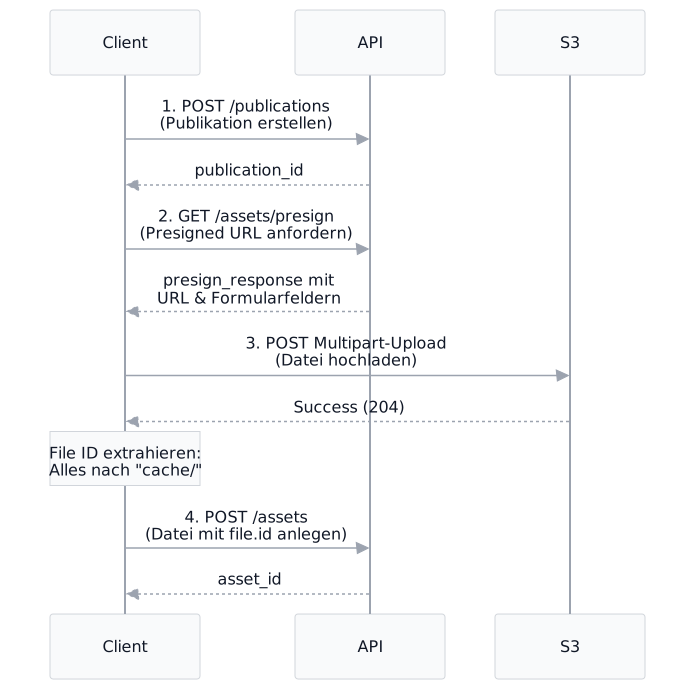
Beim Umstieg auf Librario müssen oft Daten aus dem Altsystem migriert werden. Die Datei-Bytes laufen dabei nicht durch die API, sondern gehen direkt zu S3.
Wichtiger Hinweis zur File ID
Die file.id beim Anlegen der Datei entspricht dem S3-Pfad ohne das cache/ Präfix.
Beispiel:
S3 Key: cache/1/a078705e6e55b512bb2b596c12a2a12b/dokument.pdf
File ID: 1/a078705e6e55b512bb2b596c12a2a12b/dokument.pdf
Das Backend sucht die Datei unter cache/{file.id} in S3. Bei falscher ID erhält man den Fehler:
file "..." not found on storage (Aws::S3::Errors::NoSuchKey)
Ruby
#!/usr/bin/env ruby
# frozen_string_literal: true

require 'base64'
require 'net/http'
require_relative 'librario_client'

# Imports a publication and attaches a file to it.
#
# Attaching a file is a three-step handshake, because the bytes never pass through the Librario
# API. You ask for a presigned S3 upload, PUT the bytes straight to S3, then tell Librario where
# they landed:
#
#   POST /publications        -> the record
#   GET  /assets/presign      -> a presigned S3 form
#   POST <s3 url>             -> the bytes (multipart, straight to S3)
#   POST /assets              -> links the uploaded file to the publication
#
#   LIBRARIO_BASE_URL=https://acme.mylibrar.io \
#   LIBRARIO_ACCESS_TOKEN=... \
#     ruby import_publication.rb report.pdf
#
# Needs the `library:write` scope.
class ImportPublication
  # The presigned key is prefixed with "cache/"; the asset's file id is that key WITHOUT the
  # prefix. Librario looks the upload up at "cache/#{file_id}". Get this wrong and asset creation
  # fails with a NoSuchKey error from S3 rather than anything the API can explain.
  CACHE_PREFIX = %r{\Acache/}

  # The payload the script below sends. A named constant rather than an inline literal so the
  # test suite can drive this exact hash — the version that only existed inside `__main__` drifted
  # out of shape unnoticed, because nothing could reach it.
  #
  # `categories` takes objects, not bare strings: each entry is a `{name:}` (find-or-create) or an
  # `{id:}` (associate an existing one). A bare string is rejected with 422.
  EXAMPLE_ATTRIBUTES = {
    title: 'Technische Dokumentation 2026',
    publishable_type: 'Report',
    published_on: '2026-01-15',
    authors: [{ name: 'Schmidt, Maria', type: 'person' }],
    identifiers: [{ type: 'doi', value: '10.1234/example.2026' }],
    categories: [{ name: 'Technik' }, { name: 'Forschungsbericht' }]
  }.freeze

  def initialize(client:)
    @client = client
  end

  def call(attributes, file_path: nil)
    publication = @client.create_publication(attributes)
    attach(publication_id: publication.fetch('id'), file_path:) if file_path
    publication
  end

  def attach(publication_id:, file_path:)
    presign = @client.presign_asset(filename: File.basename(file_path), type: 'application/pdf')
    upload_to_s3(presign, file_path)

    @client.create_asset(
      publication_id:,
      name: File.basename(file_path),
      content_type: 'application/pdf',
      file: {
        id: file_id(presign),
        storage: 'cache',
        metadata: {
          size: File.size(file_path),
          filename: File.basename(file_path),
          mime_type: 'application/pdf'
        }
      }
    )
  end

  # The file id Librario expects, derived from the presigned key.
  def file_id(presign) = presign.fetch('fields').fetch('key').sub(CACHE_PREFIX, '')

  private

  # S3 validates the form fields against the signed policy, so every field comes back verbatim and
  # `file` must be the last part of the multipart body.
  def upload_to_s3(presign, file_path)
    uri = URI.parse(presign.fetch('url'))
    fields = presign.fetch('fields')

    request = Net::HTTP::Post.new(uri)
    request.set_form(
      fields.map { |name, value| [name, value.to_s] } + [['file', File.open(file_path, 'rb')]],
      'multipart/form-data'
    )

    response = Net::HTTP.start(uri.hostname, uri.port, use_ssl: uri.scheme == 'https') { |http| http.request(request) }
    return if response.is_a?(Net::HTTPSuccess)

    raise LibrarioClient::Error.new(response.code.to_i, { 'error' => { 'message' => response.body.to_s[0, 200] } })
  end
end

if __FILE__ == $PROGRAM_NAME
  path = ARGV.first
  abort "usage: #{$PROGRAM_NAME} <file.pdf>" unless path

  client = LibrarioClient.new(
    base_url: ENV.fetch('LIBRARIO_BASE_URL'),
    access_token: ENV.fetch('LIBRARIO_ACCESS_TOKEN')
  )
  publication = ImportPublication.new(client:).call(ImportPublication::EXAMPLE_ATTRIBUTES, file_path: path)
  puts "imported publication #{publication.fetch('id')}"
end
Python
#!/usr/bin/env python3
"""Imports a publication and attaches a file to it.

Attaching a file is a three-step handshake, because the bytes never pass through the Librario
API. You ask for a presigned S3 upload, POST the bytes straight to S3, then tell Librario where
they landed:

    POST /publications        -> the record
    GET  /assets/presign      -> a presigned S3 form
    POST <s3 url>             -> the bytes (multipart, straight to S3)
    POST /assets              -> links the uploaded file to the publication

    LIBRARIO_BASE_URL=https://acme.mylibrar.io \
    LIBRARIO_ACCESS_TOKEN=... \
      python import_publication.py report.pdf

Needs the `library:write` scope.
"""

from __future__ import annotations

import os
import sys
from pathlib import Path
from typing import Any

import httpx

from librario_client import LibrarioClient

CONTENT_TYPE = "application/pdf"

# The payload the script below sends. A named constant rather than an inline literal so the test
# suite can drive this exact dict — the version that only existed inside ``main()`` drifted out of
# shape unnoticed, because nothing could reach it.
#
# ``categories`` takes objects, not bare strings: each entry is a ``{"name": ...}``
# (find-or-create) or an ``{"id": ...}`` (associate an existing one). A bare string is rejected
# with 422.
EXAMPLE_ATTRIBUTES: dict[str, Any] = {
    "title": "Technische Dokumentation 2026",
    "publishable_type": "Report",
    "published_on": "2026-01-15",
    "authors": [{"name": "Schmidt, Maria", "type": "person"}],
    "identifiers": [{"type": "doi", "value": "10.1234/example.2026"}],
    "categories": [{"name": "Technik"}, {"name": "Forschungsbericht"}],
}


class ImportPublication:
    def __init__(self, client: LibrarioClient) -> None:
        self._client = client

    def call(self, attributes: dict[str, Any], file_path: str | None = None) -> dict[str, Any]:
        publication = self._client.create_publication(attributes)
        if file_path:
            self.attach(publication["id"], file_path)
        return publication

    def attach(self, publication_id: int, file_path: str) -> dict[str, Any]:
        path = Path(file_path)
        presign = self._client.presign_asset(filename=path.name, content_type=CONTENT_TYPE)
        self._upload_to_s3(presign, path)

        return self._client.create_asset(
            {
                "publication_id": publication_id,
                "name": path.name,
                "content_type": CONTENT_TYPE,
                "file": {
                    "id": self.file_id(presign),
                    "storage": "cache",
                    "metadata": {
                        "size": path.stat().st_size,
                        "filename": path.name,
                        "mime_type": CONTENT_TYPE,
                    },
                },
            }
        )

    @staticmethod
    def file_id(presign: dict[str, Any]) -> str:
        """The presigned key is prefixed with ``cache/``; the asset's file id is that key WITHOUT
        the prefix. Librario looks the upload up at ``cache/{file_id}``. Get this wrong and asset
        creation fails with a NoSuchKey error from S3 rather than anything the API can explain.
        """
        return presign["fields"]["key"].removeprefix("cache/")

    @staticmethod
    def _upload_to_s3(presign: dict[str, Any], path: Path) -> None:
        """S3 validates the form fields against the signed policy, so every field goes back
        verbatim and ``file`` must be the last part of the multipart body."""
        with path.open("rb") as handle:
            response = httpx.post(
                presign["url"],
                data=presign["fields"],
                files={"file": (path.name, handle, CONTENT_TYPE)},
                timeout=30.0,
            )
        response.raise_for_status()


def main() -> None:
    if len(sys.argv) != 2:
        sys.exit(f"usage: {sys.argv[0]} <file.pdf>")

    with LibrarioClient(
        base_url=os.environ["LIBRARIO_BASE_URL"],
        access_token=os.environ["LIBRARIO_ACCESS_TOKEN"],
    ) as client:
        publication = ImportPublication(client).call(EXAMPLE_ATTRIBUTES, file_path=sys.argv[1])
    print(f"imported publication {publication['id']}")


if __name__ == "__main__":
    main()
Backups und Datensicherung
Die API bietet umfassende Möglichkeiten zur Datensicherung.
Ein einfaches Backup mittels /publications/all Endpunkt ermöglicht das seitenweise Abrufen aller Publikationen.
Weitere Details finden Sie in der Backup-Dokumentation.