REST-API
Kein Web Scraping
Bitte verwenden Sie für automatisierte Zugriffe ausschließlich die REST-API. Das Scraping der Weboberfläche wird nicht unterstützt und kann zu unerwarteten Fehlern führen. Die API bietet alle notwendigen Endpunkte für eine programmatische Integration.
Die Librario REST-API ermöglicht Ihnen die programmatische Integration und Automatisierung Ihrer Bibliotheksprozesse. Sie können damit alle wichtigen Funktionen von Librario in Ihre bestehende IT-Infrastruktur bzw. in Ihre Prozesse einbinden.
Zwei API-Versionen
Es gibt zurzeit zwei Versionen der API. Sie sind unabhängig voneinander erreichbar und unterscheiden sich sowohl im Datenmodell als auch in der Anmeldung.
| V3 | V2 | |
|---|---|---|
| Status | Preview | Veraltet, Abschaltung zum Jahresende 2026 |
| Basis-URL | /api/v3 |
/api/v2 |
| Anmeldung | OAuth 2.1 | Basic Authentication oder Session-Cookie |
| Identifikatoren | typisierte identifiers-Liste |
flache Felder doi, isbn, pmid, … |
V3 räumt Altlasten der V2 auf: eigene Endpunkte für verschachtelte Ressourcen, dedizierte DELETE-Endpunkte statt _destroy-Markern und ein vereinheitlichtes PATCH /users/:id.
Die Details stehen im Changelog-Eintrag API V3 als Preview verfügbar.
V3 ist eine Preview
Die Schnittstelle kann sich bis zur stabilen Freigabe noch ändern. Für den Produktivbetrieb empfehlen wir, die Migration jetzt zu planen und erst nach dem stabilen V3-Release umzusetzen. V2 bleibt bis zur Abschaltung unverändert verfügbar.
Zugriff auf die API
Die API ist unter folgender URL erreichbar:
https://<ihre-firma>.mylibrar.io/api, zum Beispiel: https://app.mylibrar.io/api
Falls Sie eine eigene Subdomain zugewiesen bekommen haben, können Sie diese in der URL verwenden.
API-Dokumentation
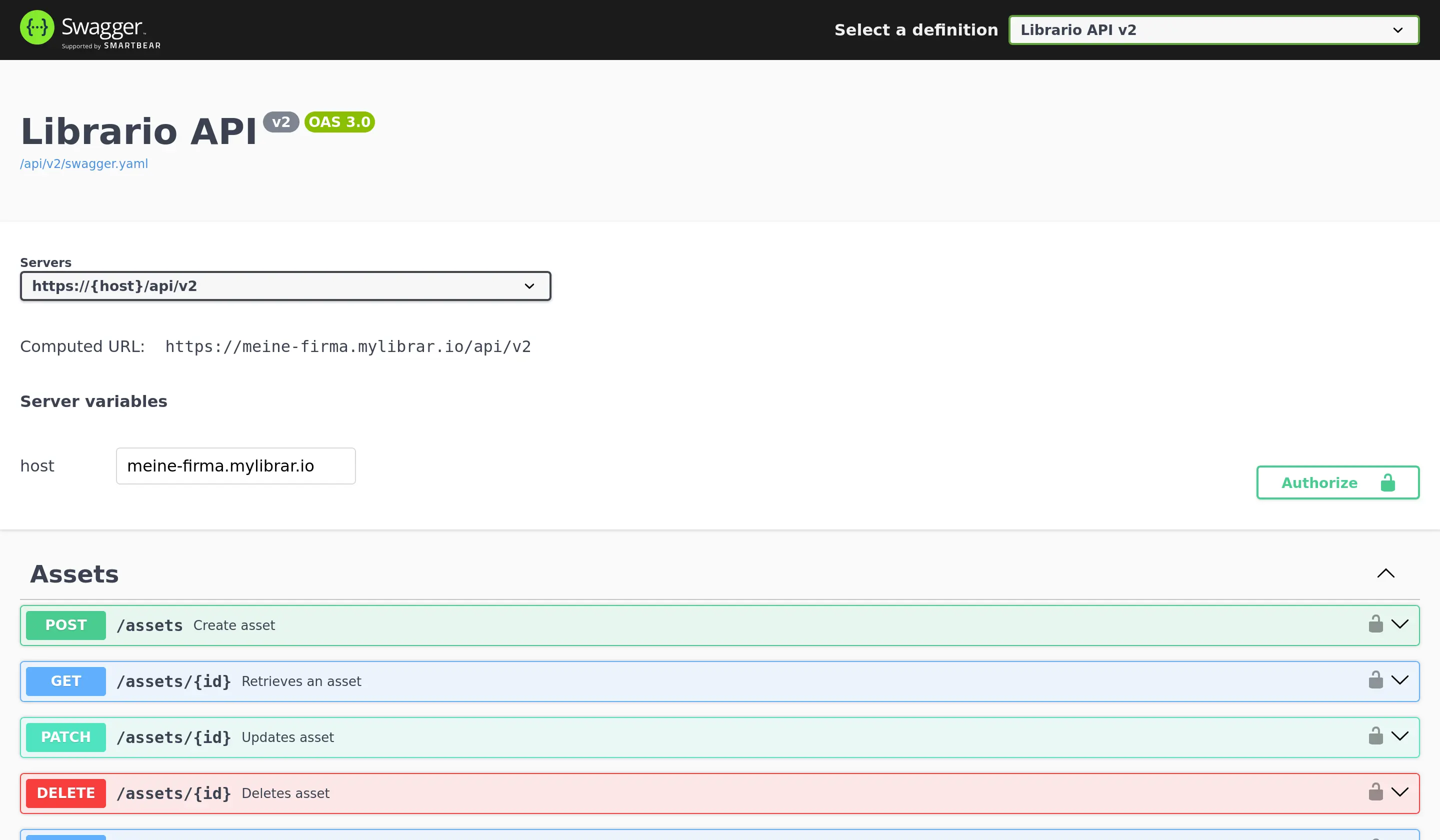
Die vollständige API-Dokumentation steht Ihnen in zwei Formaten zur Verfügung:
-
Swagger UI: Eine interaktive Web-Oberfläche zum Erkunden der API
- Erreichbar unter
https://<ihre-firma>.mylibrar.io/api - Ermöglicht das direkte Testen von API-Aufrufen
- Zeigt Beispielanfragen und -antworten
- Bietet Download der OpenAPI-Spezifikation als
swagger.yaml
- Erreichbar unter
-
OpenAPI-Spezifikation (
swagger.yaml): Eine maschinenlesbare Beschreibung der API- Basis für die automatische Generierung von API-Clients
- Kann in API-Entwicklungswerkzeuge importiert werden
- Hilfreich für die Verwendung mit KI-Tools wie ChatGPT oder Claude
Authentifizierung
Die beiden API-Versionen melden sich unterschiedlich an.
V3: OAuth 2.1
V3 akzeptiert ausschließlich OAuth 2.1 mit dem Authorization-Code-Flow. Eine Anmeldung mit Benutzername und Passwort gibt es nicht. Ein Zugriffstoken ist eine Stunde gültig und bringt ein Refresh-Token mit, das sich bei jeder Verwendung erneuert.
Jedes Token gilt für genau eine Zielressource, nämlich https://<ihre-firma>.mylibrar.io/api/v3.
Diese Adresse geben Sie beim Autorisieren im Parameter resource an.
Fehlt er bei einem selbst registrierten Client, antwortet der Autorisierungsserver mit error=invalid_target, denn ein Token ohne festgelegte Zielressource ließe sich gegen eine andere Schnittstelle wiederverwenden.
Eine Ausnahme gilt für Clients, die mit keinem Scope außer library:read und assets:read registriert sind.
Das gilt auch für eine Registrierung ganz ohne scope, denn Librario speichert dann diese beiden Scopes.
Fehlt bei einem solchen Client resource, bindet Librario das Token an den MCP-Server.
/api/v3 lehnt dieses Token mit 401 ab.
Der Header WWW-Authenticate enthält dann error="invalid_token" und error_description="audience mismatch".
Senden Sie resource in Skripten für die REST-API deshalb immer mit.
Bei Clients, die die Administration ausgestellt hat, ergänzt Librario die beim Anlegen gewählte Schnittstelle.
Beim Einlösen des Codes übernimmt das Token die Zielressource der Autorisierung; senden Sie resource dort trotzdem mit, muss der Wert übereinstimmen.
Zum Ausprobieren genügt ein Klick
Öffnen Sie https://<ihre-firma>.mylibrar.io/api und klicken Sie auf Authorize.
Client, PKCE und Zielressource sind dort bereits hinterlegt.
Nach der Anmeldung können Sie jeden Endpunkt direkt in der Swagger UI aufrufen.
Öffentliche und vertrauliche Clients
Ein Client ist öffentlich, wenn er sich am Token-Endpunkt nicht ausweist, und vertraulich, wenn er das mit einem Client-Secret tut. Librario stellt beide Arten aus. Welche Sie erhalten, entscheidet sich auf einem von zwei Wegen.
Selbstregistrierung (Dynamic Client Registration).
Ihr Programm meldet sich unter POST /oauth/clients selbst an.
Das Feld token_endpoint_auth_method bestimmt die Art: Der Wert none ergibt einen öffentlichen Client ohne Secret.
Lassen Sie das Feld weg, gilt nach RFC 7591 der Vorgabewert client_secret_basic, und Sie erhalten einen vertraulichen Client mit Secret.
Unterstützt werden none, client_secret_basic und client_secret_post.
Das client_secret steht ausschließlich in der Antwort auf die Registrierung; ein zweites Mal wird es nicht ausgegeben.
Von der Administration ausgestellt.
Soll der Client dem Konto gehören statt der Person, die ihn registriert hat, stellt eine Person mit Administrator-Rolle einen Client für die Schnittstelle REST-API aus.
Der Client mit Registrierung, Client Secret, Wechsel und Widerruf gehört dem Konto und bleibt bestehen, wenn Mitarbeitende wechseln. Jede Verbindung gehört der Person, die sich angemeldet hat, und läuft mit deren Rollen. Verlässt diese Person das Team, meldet sich eine andere einmal an, und die Integration läuft mit demselben Client weiter.
Dasselbe gilt für Connectoren, die Client ID und Client Secret im Voraus verlangen.
Die Administration sieht den Client in der Konto-Verwaltung, wechselt sein Client Secret mit Übergangsfrist und beendet mit einem Widerruf alle Verbindungen auf einmal.
Diese Clients sind immer vertraulich; sie weisen sich mit client_secret_basic oder client_secret_post aus.
Mit client_secret_basic senden Sie Client ID und Client Secret als HTTP-Basic-Authentifizierung an POST /oauth/token; code und code_verifier stehen wie bei einem öffentlichen Client im Anfragekörper.
Das Client Secret erscheint genau einmal, und es gelten höchstens zwei gleichzeitig, damit sich ein Wechsel ohne Unterbrechung durchführen lässt.
Anlegen, Wechseln und Widerrufen beschreibt die Seite OAuth-Clients für Integrationen.
Dieser Weg gehört zur erweiterten KI-Verwaltung und steht nur in Tarifen mit diesem Bestandteil offen; die Selbstregistrierung ist davon nicht betroffen.
PKCE (Verfahren S256) verlangt Librario von jedem selbst registrierten Client, gleich ob öffentlich oder vertraulich.
Bei Clients, die die Administration ausstellt, ist PKCE beim Erstellen wählbar und standardmäßig eingeschaltet; schalten Sie es nur ab, wenn der Connector keinen code_challenge sendet.
Registriert sich ein Werkzeug selbst und sendet dabei keinen code_challenge, kann der Support die Anforderung für die vertraulichen Clients Ihres Kontos aufheben.
Für öffentliche Clients bleibt PKCE immer erforderlich.
Für Skripte übernimmt das folgende Beispiel den vollständigen Ablauf: Es registriert sich mit token_endpoint_auth_method: "none" selbst als öffentlicher OAuth-Client (Dynamic Client Registration), erzeugt den PKCE-Nachweis, nimmt die Weiterleitung auf einem lokalen Port entgegen und tauscht den Code gegen ein Token.
Ruby
# frozen_string_literal: true

require 'base64'
require 'digest'
require 'json'
require 'net/http'
require 'securerandom'
require 'socket'
require 'uri'

# Obtains a Librario v3 access token from a script, with no client secret anywhere.
#
# The whole OAuth 2.1 dance, in four steps:
#
#   1. Register this script as an OAuth client (RFC 7591). No pre-arrangement with Librario, and
#      `token_endpoint_auth_method: 'none'` asks for a public client, so there is no secret to
#      store; omitting that field would get one issued. Keep the returned client_id;
#      re-registering on every run is wasteful and each Librario tenant only accepts a bounded
#      number of registrations per day.
#   2. Generate a PKCE verifier and its S256 challenge (RFC 7636). Librario accepts S256 only.
#   3. Send the user to /oauth/authorize and catch the redirect on a loopback listener
#      (RFC 8252). Loopback is the one place Librario permits a plain-http callback.
#   4. Exchange the code for a token, proving possession of the verifier.
#
# `resource` (RFC 8707) appears in steps 3 and 4. It names which Librario surface the token is
# for. Omit it and the authorization server refuses with `invalid_target`, because a token has
# to be bound to exactly one audience.
#
#   token = OAuthPkceLogin.new(base_url: 'https://acme.mylibrar.io').call
#   client = LibrarioClient.new(base_url: 'https://acme.mylibrar.io', access_token: token['access_token'])
#
# Access tokens live one hour. `token['refresh_token']` renews them; it rotates on every use.
class OAuthPkceLogin
  class Error < StandardError
  end

  DEFAULT_SCOPE = 'library:read library:write users:read users:write tasks:read tasks:write'

  # @param base_url [String] e.g. "https://acme.mylibrar.io"
  # @param client_id [String, nil] from a previous run; registers a new client when nil
  # @param scope [String] space-delimited
  # @param port [Integer] loopback port for the callback listener
  def initialize(base_url:, client_id: nil, scope: DEFAULT_SCOPE, port: 8765)
    @base_url = base_url.to_s.chomp('/')
    @client_id = client_id
    @scope = scope
    @port = port
  end

  # Runs the full flow and returns the parsed token response.
  #
  # Yields the authorization URL when a block is given, instead of opening a browser. That is
  # what the test suite uses; a real script wants the default.
  def call(&open_url)
    client_id = @client_id || register_client.fetch('client_id')
    verifier = generate_code_verifier
    state = SecureRandom.urlsafe_base64(16)

    server = TCPServer.new('127.0.0.1', @port)
    url = authorization_url(client_id:, verifier:, state:)
    open_url ? yield(url) : open_browser(url)

    code = await_callback(server, expected_state: state)
    exchange_code(code:, client_id:, verifier:)
  ensure
    server&.close
  end

  # RFC 7591. The redirect URI must be a loopback IP with an explicit port: Librario rejects
  # `http://localhost/...` without one, because Doorkeeper's any-port loopback matching only
  # applies to IP literals and such a client could never complete a login.
  def register_client
    post_form(
      "#{@base_url}/oauth/clients",
      client_name: 'Librario example script',
      redirect_uris: [redirect_uri],
      grant_types: %w[authorization_code refresh_token],
      response_types: %w[code],
      token_endpoint_auth_method: 'none',
      scope: @scope
    )
  end

  def authorization_url(client_id:, verifier:, state:)
    query = {
      response_type: 'code',
      client_id:,
      redirect_uri:,
      scope: @scope,
      state:,
      code_challenge: code_challenge(verifier),
      code_challenge_method: 'S256',
      resource: api_v3_audience
    }
    "#{@base_url}/oauth/authorize?#{URI.encode_www_form(query)}"
  end

  def exchange_code(code:, client_id:, verifier:)
    post_form(
      "#{@base_url}/oauth/token",
      grant_type: 'authorization_code',
      code:,
      redirect_uri:,
      client_id:,
      code_verifier: verifier,
      resource: api_v3_audience
    )
  end

  private

  def post_form(url, **params)
    uri = URI.parse(url)
    request = Net::HTTP::Post.new(uri)
    request['Content-Type'] = 'application/json'
    request['Accept'] = 'application/json'
    request.body = JSON.generate(params)

    response = Net::HTTP.start(uri.hostname, uri.port, use_ssl: uri.scheme == 'https') { |http| http.request(request) }
    body = response.body.to_s.empty? ? {} : JSON.parse(response.body)
    raise Error, "#{uri.path} failed: HTTP #{response.code} #{body}" unless response.is_a?(Net::HTTPSuccess)

    body
  end

  def redirect_uri = "http://127.0.0.1:#{@port}/callback"
  def generate_code_verifier = SecureRandom.urlsafe_base64(32)

  def code_challenge(verifier)
    Base64.urlsafe_encode64(Digest::SHA256.digest(verifier), padding: false)
  end

  def api_v3_audience = "#{@base_url}/api/v3"

  def open_browser(url)
    opener = %w[xdg-open open].find { |cmd| system('which', cmd, out: File::NULL, err: File::NULL) }
    opener ? system(opener, url, out: File::NULL, err: File::NULL) : warn("Open this URL to authorize:\n\n  #{url}\n")
  end

  # Blocks until the browser follows the redirect back to the loopback listener.
  def await_callback(server, expected_state:)
    socket = server.accept
    query = callback_query(socket.gets.to_s)

    respond(socket, query['error'] ? "Authorization failed: #{query['error']}" : 'Authorized. You can close this tab.')
    socket.close

    raise Error, "authorization failed: #{query['error']}" if query['error']
    raise Error, 'state mismatch — possible CSRF, aborting' unless query['state'] == expected_state

    query.fetch('code')
  end

  # "GET /callback?code=...&state=... HTTP/1.1" -> { "code" => ..., "state" => ... }
  def callback_query(request_line)
    path = request_line.split[1].to_s
    URI.decode_www_form(URI.parse(path).query.to_s).to_h
  end

  def respond(socket, message)
    socket.print("HTTP/1.1 200 OK\r\nContent-Type: text/plain\r\nContent-Length: #{message.bytesize}\r\n\r\n#{message}")
  end
end
Python
"""Obtains a Librario v3 access token from a script, with no client secret anywhere.

The whole OAuth 2.1 dance, in four steps:

1. Register this script as an OAuth client (RFC 7591). No pre-arrangement with Librario, and
   ``token_endpoint_auth_method: "none"`` asks for a public client, so there is no secret to
   store; omitting that field would get one issued. Keep the returned ``client_id``:
   re-registering on every run is wasteful, and each Librario tenant only accepts a bounded
   number of registrations per day.
2. Generate a PKCE verifier and its S256 challenge (RFC 7636). Librario accepts S256 only.
3. Send the user to ``/oauth/authorize`` and catch the redirect on a loopback listener (RFC 8252).
   Loopback is the one place Librario permits a plain-http callback.
4. Exchange the code for a token, proving possession of the verifier.

``resource`` (RFC 8707) appears in steps 3 and 4. It names which Librario surface the token is
for. Omit it and the authorization server refuses with ``invalid_target``, because a token has to
be bound to exactly one audience.

    token = OAuthPkceLogin(base_url="https://acme.mylibrar.io").call()
    client = LibrarioClient(base_url="https://acme.mylibrar.io", access_token=token["access_token"])

Access tokens live one hour. ``token["refresh_token"]`` renews them; it rotates on every use.
"""

from __future__ import annotations

import base64
import hashlib
import http.server
import secrets
import threading
import urllib.parse
import webbrowser
from collections.abc import Callable
from typing import Any

import httpx

DEFAULT_SCOPE = "library:read library:write users:read users:write tasks:read tasks:write"


class OAuthError(Exception):
    pass


class OAuthPkceLogin:
    def __init__(
        self,
        base_url: str,
        client_id: str | None = None,
        scope: str = DEFAULT_SCOPE,
        port: int = 8765,
    ) -> None:
        self.base_url = base_url.rstrip("/")
        self.client_id = client_id
        self.scope = scope
        self.port = port

    @property
    def redirect_uri(self) -> str:
        return f"http://127.0.0.1:{self.port}/callback"

    @property
    def api_v3_audience(self) -> str:
        return f"{self.base_url}/api/v3"

    def call(self, open_url: Callable[[str], None] | None = None) -> dict[str, Any]:
        """Runs the full flow and returns the parsed token response.

        ``open_url`` receives the authorization URL instead of a browser being opened. That is
        what the test suite uses; a real script wants the default.
        """
        client_id = self.client_id or self.register_client()["client_id"]
        verifier = secrets.token_urlsafe(32)
        state = secrets.token_urlsafe(16)

        with _CallbackListener(self.port) as listener:
            url = self.authorization_url(client_id=client_id, verifier=verifier, state=state)
            (open_url or webbrowser.open)(url)
            query = listener.wait()

        if "error" in query:
            raise OAuthError(f"authorization failed: {query['error']}")
        if query.get("state") != state:
            raise OAuthError("state mismatch — possible CSRF, aborting")

        return self.exchange_code(code=query["code"], client_id=client_id, verifier=verifier)

    def register_client(self) -> dict[str, Any]:
        """RFC 7591. The redirect URI must be a loopback IP with an explicit port: Librario
        rejects ``http://localhost/...`` without one, because Doorkeeper's any-port loopback
        matching only applies to IP literals and such a client could never complete a login.
        """
        return self._post_json(
            f"{self.base_url}/oauth/clients",
            {
                "client_name": "Librario example script",
                "redirect_uris": [self.redirect_uri],
                "grant_types": ["authorization_code", "refresh_token"],
                "response_types": ["code"],
                "token_endpoint_auth_method": "none",
                "scope": self.scope,
            },
        )

    def authorization_url(self, client_id: str, verifier: str, state: str) -> str:
        query = urllib.parse.urlencode(
            {
                "response_type": "code",
                "client_id": client_id,
                "redirect_uri": self.redirect_uri,
                "scope": self.scope,
                "state": state,
                "code_challenge": _code_challenge(verifier),
                "code_challenge_method": "S256",
                "resource": self.api_v3_audience,
            }
        )
        return f"{self.base_url}/oauth/authorize?{query}"

    def exchange_code(self, code: str, client_id: str, verifier: str) -> dict[str, Any]:
        return self._post_json(
            f"{self.base_url}/oauth/token",
            {
                "grant_type": "authorization_code",
                "code": code,
                "redirect_uri": self.redirect_uri,
                "client_id": client_id,
                "code_verifier": verifier,
                "resource": self.api_v3_audience,
            },
        )

    @staticmethod
    def _post_json(url: str, payload: dict[str, Any]) -> dict[str, Any]:
        response = httpx.post(url, json=payload, headers={"Accept": "application/json"}, timeout=10.0)
        body = response.json() if response.content else {}
        if not response.is_success:
            raise OAuthError(f"{urllib.parse.urlparse(url).path} failed: HTTP {response.status_code} {body}")
        return body


def _code_challenge(verifier: str) -> str:
    digest = hashlib.sha256(verifier.encode()).digest()
    return base64.urlsafe_b64encode(digest).rstrip(b"=").decode()


class _CallbackListener:
    """Serves exactly one request on the loopback port and hands back its query string."""

    def __init__(self, port: int) -> None:
        self._query: dict[str, str] = {}
        listener = self

        class Handler(http.server.BaseHTTPRequestHandler):
            def do_GET(self) -> None:  # noqa: N802 - name fixed by BaseHTTPRequestHandler
                parsed = urllib.parse.urlparse(self.path)
                listener._query = dict(urllib.parse.parse_qsl(parsed.query))
                body = b"Authorized. You can close this tab."
                self.send_response(200)
                self.send_header("Content-Type", "text/plain")
                self.send_header("Content-Length", str(len(body)))
                self.end_headers()
                self.wfile.write(body)

            def log_message(self, *_args: Any) -> None:
                pass

        self._server = http.server.HTTPServer(("127.0.0.1", port), Handler)
        self._thread = threading.Thread(target=self._server.handle_request, daemon=True)

    def __enter__(self) -> _CallbackListener:
        self._thread.start()
        return self

    def __exit__(self, *_exc: object) -> None:
        self._server.server_close()

    def wait(self, timeout: float = 300.0) -> dict[str, str]:
        self._thread.join(timeout)
        if self._thread.is_alive():
            raise OAuthError("timed out waiting for the authorization redirect")
        return self._query
Client-ID aufbewahren
Die Registrierung ist einmalig. Speichern Sie die zurückgegebene client_id und geben Sie sie beim nächsten Lauf mit, statt sich erneut zu registrieren.
Registrieren Sie sich vertraulich, gehört das client_secret aus derselben Antwort dazu.
Jede Bibliothek nimmt pro Tag nur eine begrenzte Zahl an Registrierungen entgegen.
V3: Berechtigungen
Ein Token trägt die Schnittmenge aus den angefragten Berechtigungen, dem, was der Client bei der Registrierung angemeldet hat, und dem, was die anmeldende Person auf der Zustimmungsseite freigegeben hat.
| Scope | Erlaubt | Endpunkte |
|---|---|---|
library:read |
Publikationen, Exemplare, Sammlungen und Normdaten lesen | GET /publications, /hard_copies, /authorities, /collections, /hard_copies/locations |
library:write |
Bibliotheksdaten anlegen und ändern, bei Publikationen, Exemplaren und Sammlungen auch löschen | POST/PATCH/DELETE /publications, /hard_copies, /collections; POST/PATCH /authorities (ohne Löschen, stattdessen merge); PATCH /hard_copies/locations (nur Ändern und merge, kein Anlegen und kein Löschen); GET /publications/cover/presign |
assets:read |
Angehängte Dateien und Download-Links lesen | GET /assets/:id; entscheidet außerdem, ob url, thumb_url und preview_url in Antworten von /assets und /publications überhaupt erscheinen |
assets:write |
Angehängte Dateien hochladen, ändern und löschen | POST/PATCH/DELETE /assets, GET /assets/presign; gilt auch für Dateiinhalt, der über assets/assets_attributes beim Anlegen oder Ändern einer Publikation mitgeschickt wird; dafür reicht library:write allein nicht |
users:read |
Benutzerverzeichnis lesen | GET /users, GET /users/:id; GET /users/me liefert den eigenen Datensatz und verlangt keinen Scope |
users:write |
Benutzer:innen verwalten | POST/PATCH/DELETE /users, GET /users/avatar/presign |
tasks:read |
Aufgaben und Qualitätsprüfungen lesen | GET /tasks |
tasks:write |
Aufgaben anlegen, bearbeiten und abschließen | POST/PATCH /tasks |
Fehlt einem Token eine Berechtigung, antwortet die API mit 403 InsufficientScope und nennt im Header WWW-Authenticate den fehlenden Scope. Tokens, die vor Einführung von assets:read und assets:write ausgestellt wurden, haben diese Berechtigungen automatisch erhalten, soweit sie library:read beziehungsweise library:write trugen.
V2: Basic Authentication oder Session-Cookie
V2 kennt zwei Verfahren:
- Basic Authentication mit den normalen Librario-Zugangsdaten.
- Session-Cookie (
_library_session), wenn der Aufruf aus einer bereits angemeldeten Browser-Sitzung erfolgt.
Die Berechtigungen entsprechen in beiden Fällen den in der Anwendung konfigurierten Rollen.
Technische Benutzer für Integrationen
Es wird empfohlen, für automatisierte Prozesse dedizierte technische Zugänge anzulegen. Dies macht die Integration unabhängig von personenbezogenen Accounts und vereinfacht die Verwaltung von Zugriffsrechten.
Beispiele für V2 führen wir nicht mehr auf. Die vollständige Beschreibung finden Sie in der OpenAPI-Spezifikation unter https://<ihre-firma>.mylibrar.io/api/v2/swagger.yaml.
Datenformat
Die API nutzt das JSON-Format für den Datenaustausch. Dieses Format ist in allen gängigen Programmiersprachen einfach zu verarbeiten.
Paginierung
Bei Listen-Endpoints wird die Ausgabe auf 25 Einträge pro Seite begrenzt, maximal sind 50 möglich. Um alle Datensätze zu erhalten, rufen Sie die Seiten nacheinander ab.
Die Navigation wird durch spezielle Response-Header erleichtert:
X-Total: Gesamtanzahl der verfügbaren EinträgeLink: URLs für erste/vorherige/nächste/letzte Seite
Beispiele
Lauffähige Ruby- und Python-Skripte für einen minimalen Client, den Abgleich von Publikationslisten, den Datenimport mit Dateien und Backups stehen auf der Seite REST-API: Beispiele.
Best Practices
Anfragerate
Bitte begrenzen Sie automatisierte Zugriffe auf etwa 60 Anfragen pro Minute, verwenden Sie bei Listenabfragen die Paginierung und verarbeiten Sie große Datenmengen in kleineren Batches.
Fehlerbehandlung
Die API verwendet folgende HTTP-Statuscodes:
200: Anfrage erfolgreich401: Nicht autorisiert, etwa weil das Token abgelaufen ist403: Zugriff verweigert oder Berechtigung fehlt (InsufficientScope)404: Ressource nicht gefunden. Beim Anlegen oder Ändern einer Publikation auch, wenn eineidfür Beitragende, eine Kategorie oder eine Organisation in Ihrem Konto nicht existiert (Kategorie und Organisation nur in der API v3)422: Eingabe konnte nicht verarbeitet werden429: Zu viele Anfragen500: Interner Serverfehler
Fehlerantworten enthalten zusätzliche Details im JSON-Format:
{
  "error": {
    "code": "RecordNotFound",
    "message": "Requested record not found"
  }
}