Setting up a review process
A structured review process makes sure your colleagues quickly find the publications that matter to them. This guide shows you how to set up an effective review routine.
How reviews improve literature search
A good review process makes literature easier to find in three ways:
- Find current literature: With the original title and edition filled in, users go straight to the newest edition and, for standards, to the successor
- Filter search results: Consistent categories and subject areas let users narrow the results down to what they need
- Get precise search results: Consistent technical terms and keywords help users find exactly the publications they are looking for
Control the review status with the quality review
On every publication and contributor page (contributors are, for example, authors or editors), Librario shows a Quality assurance card where you record the review status of each entry. This is how it works:
- After an import, the entry is set to Not reviewed, and Librario creates a quality-review task automatically.
- You open the publication and click Mark as reviewed. If someone else is better placed to check it, click Request review.
- Quality-review tasks from imports and requested reviews appear on the Kanban board, where you can assign, work on and close them.
For a detailed description of the card’s actions and its two statuses, see Task types: quality review.
Quality criteria for good findability
Maintain the metadata
- Make sure titles and names are spelled consistently
- Add missing bibliographic details
- Check identifiers (DOI, ISBN) for correctness
- Check that PDF files contain searchable text
Describe the content
- Assign suitable categories for subject searches
- Add relevant and consistent keywords
- Maintain the important links:
- Assign publications to their series
- Enter the same original title and the edition number for every edition of a work. Librario then points to the newest edition
- For standards, maintain the predecessors and successors
Organise reviews in your team
-
Define responsibilities
- Decide who is responsible for which subject area
- Agree on the process for quality control
- Use recurring tasks for regular routines (part of advanced task management)
- Assign the review tasks from imports to one responsible person: in the account settings, choose Assign to specific user under Auto-assignment → Data quality (also part of advanced task management)
-
Set up regular review cycles
- Schedule fixed times for reviews, for example a weekly slot for checking entries
- Document who stands in for whom
-
Keep improving
- Talk to each other in the team regularly
- Document agreed conventions and common mistakes
- Adjust the processes when needed
If you run the library on your own
When you review, start with the publications people ask for. You can delegate adding publications to student assistants or an office assistant with the librarian role. The subject-matter responsibility stays with you.
Find quality problems with Librario’s reports
On the Our account page (user icon at the top right, then Our account), Librario gives you a systematic overview of possible quality problems:
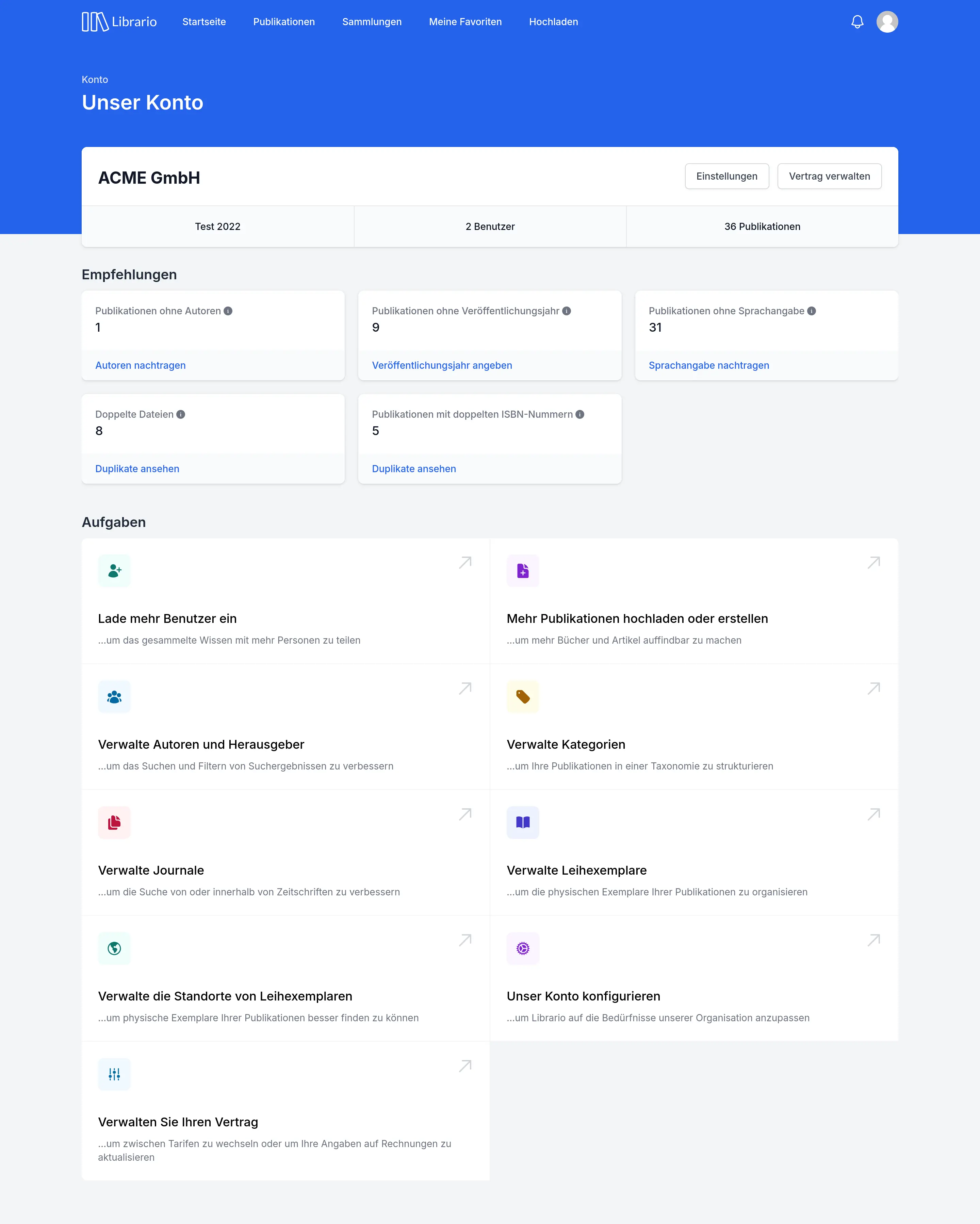
Screenshot of the German interface.
Review recommendations
Librario analyses your holdings continuously and shows recommendations for different areas. For example:
-
Incomplete metadata:
- Publications without authors
- Publications without a publication year
- Publications without a language
-
Possible duplicates:
- Duplicate files
- ISBNs recorded more than once
- DOIs recorded more than once
For each recommendation, you can view and edit the affected publications directly.
Carry out routine tasks
The Actions section of the same page takes you straight to important administrative tasks, for example:
- Manage contributors: clean up inconsistent spellings of names
- Manage categories: maintain the taxonomy and merge categories when needed
- Manage the locations of hard copies: keep hard copies organised at the right locations
Common challenges
Challenge: too many publications to review
Solution:
- Prioritise by importance
- Spread the workload across several people, or delegate adding publications if you work alone (see the tip above)
- Schedule dedicated review times
Challenge: inconsistent categorisation
Solution:
- Write a categorisation guide and share it with your team
- Use the Manage categories tile on the Our account page to merge or rename categories
Challenge: missing subject expertise
Solution:
- Identify experts in your organisation and involve them in the review process
- Document special requirements