Skip to content
Automated cataloguing

Cataloguing without the typing

Librario extracts metadata straight from PDF files and fills in missing details via ISBN or DOI. It takes the tedious data entry off your hands, flags possible duplicates when you import by identifier, and makes your holdings searchable straight away.

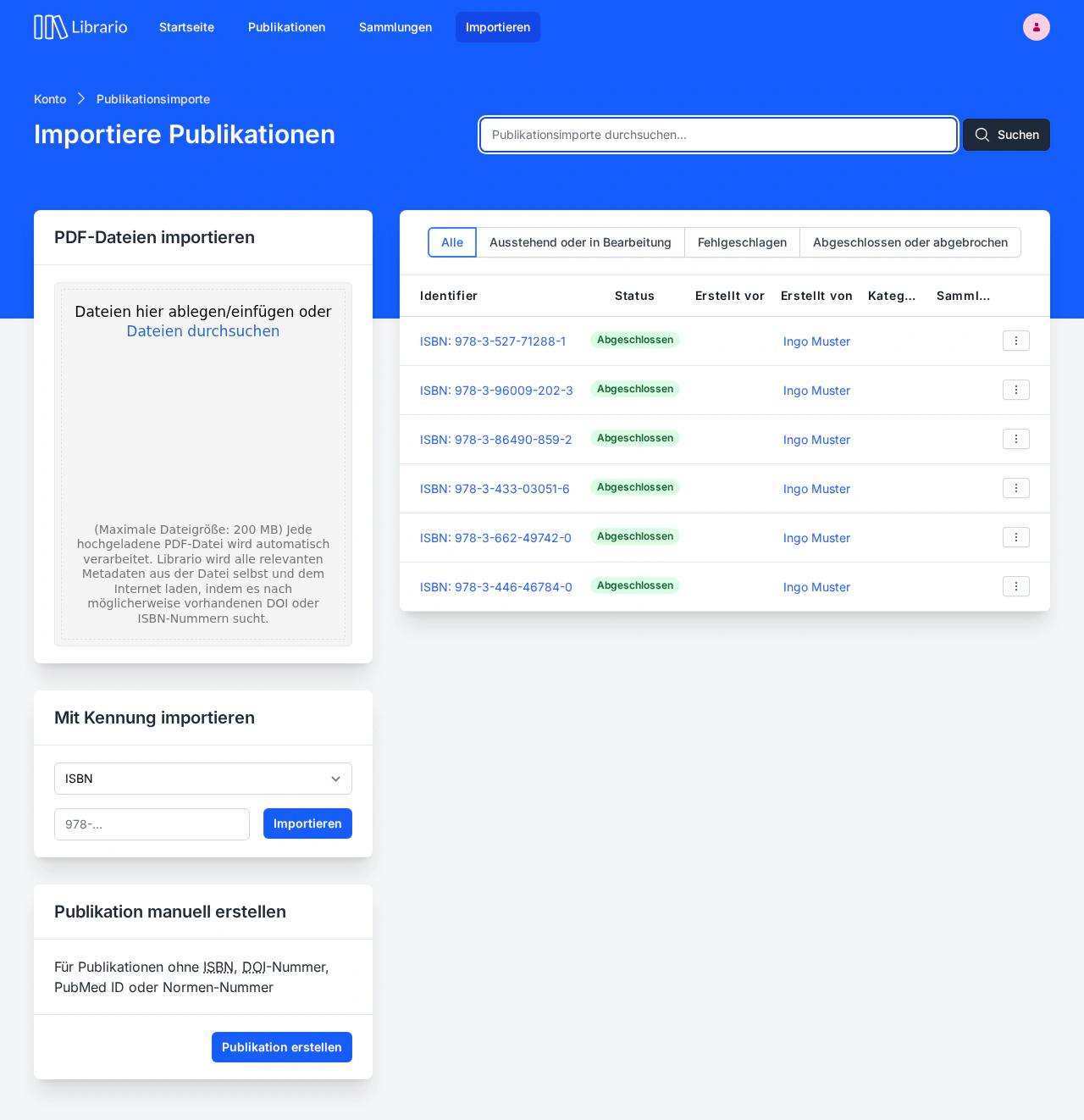
Librario's Publication imports page: on the left, stacked, the panels for uploading PDF files, importing by identifier and creating a publication manually; on the right, the list of completed imports.
Screenshot of the German interface.

The bottleneck

Manual cataloguing does not scale

A new delivery lands on your desk: ten specialist books, three journal volumes and a stack of conference papers as PDF files. You know what comes next: open the publisher’s website, copy the title, type the authors into the form, look up the publication year, close the page, next book. Ten times over, interrupted by research requests and the rest of the day’s work.

This is not the exception. It is everyday life in most corporate libraries. When the backlog grows, important publications have been bought but still cannot be found in the system. Then come the typos: a misspelt name or two swapped digits in the publication year make a publication practically invisible to search.

The problem is not that library work is complex. It is typing in metadata that has long existed in digital form.
What automation delivers

publications and more: mid-sized company libraries typically manage 3,000–6,000, large engineering firms more than 30,000. Automated cataloguing grows with your holdings.
30,000+
records in the connected Crossref database alone, used to enrich bibliographic metadata.
180 million
Librario checks your holdings automatically for duplicates, data gaps and failed imports, and creates tasks for what it finds.
Daily

The features

From file to reviewed catalogue record

  • PDF metadata extraction

    You drag a PDF into your browser. Librario analyses the file at once and reads the title, authors and publication year. At the same time the full text goes into the search index, so full-text search works right inside the document.
  • ISBN and DOI enrichment

    Librario matches the identifiers it detects, such as ISBN, DOI, PubMed or arXiv IDs against external databases. With or without hyphens: Librario normalises the input automatically. Missing details are filled in, with no typing and no copying.
  • Less routine, same expert judgement

    Automation takes over the tedious data entry. What remains is the expert judgement: checking extracted metadata, assessing possible duplicates, curating collections. With advanced task management, every import creates a quality-review task on the Kanban board. That lets you hand the groundwork to student assistants or office assistants while responsibility for the content stays with the team.
  • Duplicate detection on import

    When you import, Librario compares the identifier with your holdings. If the publication already exists, a dialog shows the existing record. You decide whether it is a duplicate or a legitimate special case, such as a multi-volume work sharing one ISBN. That keeps your collections consistent.

The workflow

From upload to release

01 · CAPTURE

Three ways into the catalogue

If you have the publication as a PDF, drag it into the browser window. The metadata comes from the document itself.

If you only have the identifier, enter the ISBN, DOI or standard identifier. The publisher’s data comes from the online lookup.

If you have neither, use the manual entry form for in-house reports, theses or historical works.

02 · ENRICHMENT

Query the databases

Librario queries Crossref, Open Library and other bibliographic sources. Where available, the cover and table of contents come along too. That improves the quality of your search results immediately.

03 · REVIEW

Stay in control

If Librario spots a possible duplicate when you import by identifier, it shows the existing record right in the dialog, and you decide. Daily checks also find duplicates, data gaps and failed imports in your existing holdings and create tasks for them. With advanced task management, every import also creates a quality-review task to complete before release.

04 · RELEASE

Searchable straight away

Once the import is complete, the record is visible to your whole team. The full text is indexed and can be found through search.

Less typing, more time for your holdings.

See in a demo how Librario captures a new PDF: full text indexed, metadata filled in. Import by ISBN or DOI, and Librario flags possible duplicates at once.