02 · PLAIN LANGUAGE
If you can use a browser, you can use Librario.
No installation, no VPN, no IT ticket. Librario runs in the browser, with fields in everyday language instead of cataloguing codes. A library that people actually use, because nothing stands in their way.
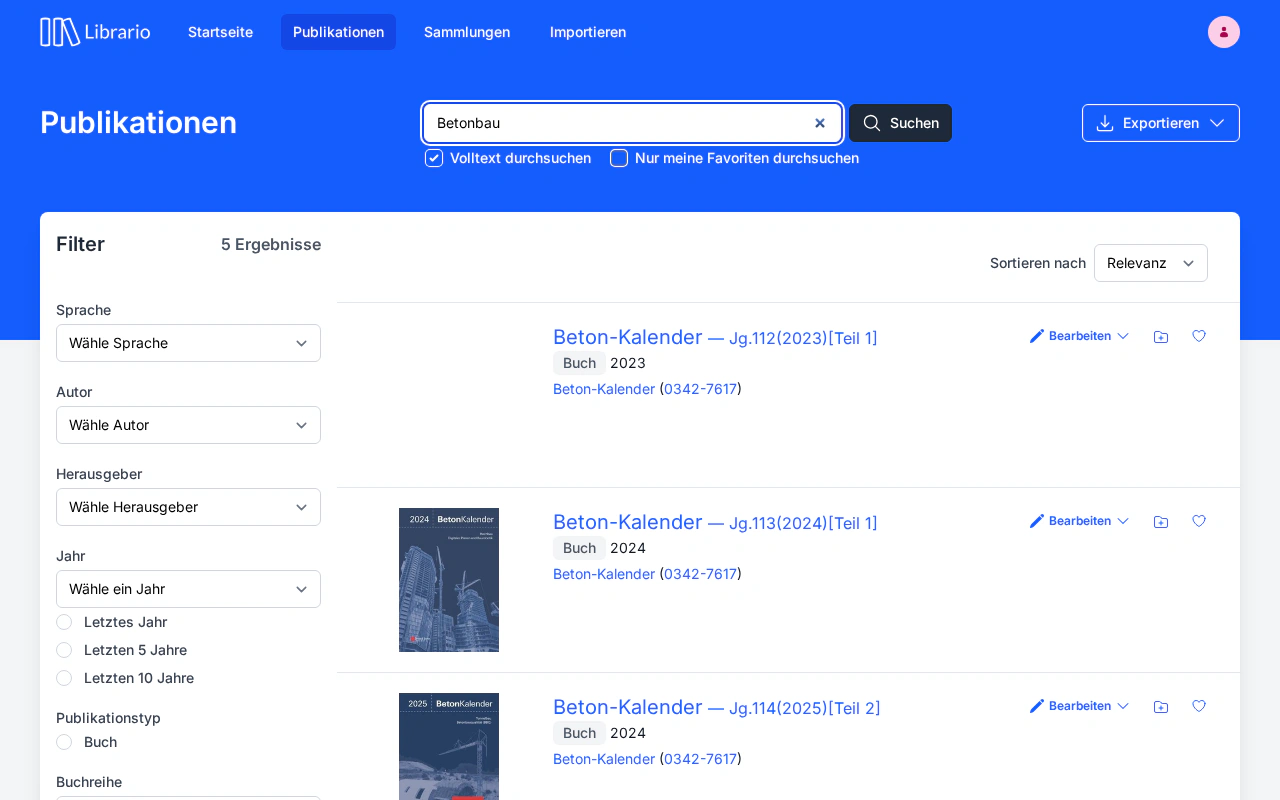
The situation
Traditional library software is built for librarians, not for everyone else
Open a classic library system today and you land in a world of menu bars, function keys and field names that have barely changed since the 1990s. MARC fields, shelfmark templates, cryptic field abbreviations: all of it makes sense if you have a degree in librarianship. For everyone else it is a barrier.
That is exactly the problem in corporate libraries: the librarian maintains the catalogue, but the employees are the ones meant to use it. If search isn’t intuitive, they go to Google or ask in person. Library installed, library unused. That is why Librario measures itself against the browser: if you can use a website, you can search in Librario.
The cost goes beyond convenience: a library that nobody actively uses cannot justify itself. No return on the acquisition costs, no time saved through faster search, no knowledge shared through Collections. Your investment in specialist literature only pays off when the software stays out of the way.
No training, no installation
Usability is not a design feature: it decides whether a library is actively used.
- Training costs for new employees: if you can use a browser, you find your way around Librario without an introductory course
- €0
- No installation, no VPN, no IT ticket: Librario runs in Chrome, Firefox, Safari and Edge, at the desk, when working from home and on site
- Browser only
- The interface comes in German and English; search analyses technical texts in German, English, Italian, Spanish and French
- Search in five languages
The complication
Two interfaces, and people avoid one of them
The difference between a system that librarians operate and one that every employee uses unprompted is not a question of training. It is a question of design.
- × Users open the system and, two minutes later, phone the librarian: “How do I search in here again?”
- × Searching happens at a dedicated research workstation in the library: the licence is per workstation, not per person. Anyone who wants to search waits until the workstation is free.
- × It has to be installed on every workstation; field staff have no access, and remote work needs a VPN.
- × New employees need an introductory training session before they can read their first catalogue record.
-
×
To anyone who isn’t a librarian, field names such as
245 $a,100 $eor700 $aare just noise. - × Mobile devices aren’t supported: you can’t look up a standard on site.
- ✓ Open the search field in the browser, type a search term, click the result: full-text search across every PDF is included. The documentation is there when you need it; for your first search, you won’t.
- ✓ Every browser is a research workstation. Nobody waits for the one seat in the library; everyone searches at the same time.
- ✓ No installation, no VPN, no rollout by IT. Working from home, on site or at a conference, everyone uses the same interface.
- ✓ New employees find their own way around on day one: one search field, clear field names and an interface without special conventions.
- ✓ Fields are called Title, Author, Publication date: no codes, no abbreviations.
- ✓ Responsive on desktop, tablet and smartphone: looking up a standard on site works.
The solution
At home in the browser, ready on every device
-
Browser only, no IT effortLibrario runs in any modern browser. No installation, no plug-in, no desktop client. Employees open the URL and get straight to work. Updates happen automatically in the background: no outdated local client package and no IT ticket for the next release.
-
Everyday language, not specialist codesFields are called Title, Author and Publication date: no library jargon that people who aren’t librarians first have to decode. The metadata behind them stays structured and exportable (BibTeX, EndNote), and you keep professional control of the catalogue.
-
Multilingual for international teamsThe interface comes in German and English; each person picks their own interface language, whatever the language of the holdings. Search analyses technical texts in German (compound words included), English, Italian, Spanish and French.
-
Mobile, even on siteThe responsive design works equally well on desktop, tablet and smartphone. Look up standards on site, open a publication when working from home, search the holdings from a tablet: Librario adapts to the device, not the other way round.
In detail
Four reasons your team actually uses the library
01 · SEARCH
Search the way you’re used to, find with a catalogue’s precision
03 · CAPTURE
Captured in seconds, maintained on the side
04 · AI ACCESS
The library where the work happens
A library everyone uses. Not just the one person who maintains it.
See in a demo how Librario works without training: from the first sign-in to the first search in under three minutes.