Skip to content
Full-text search

Find what is inside, not just what is on the cover

Switch on full text and Librario searches the complete text of your PDF files: body text, tables and footnotes, not just titles and keywords. German compound words such as “Stahlbetonverbundbalken” (steel-concrete composite beam) are split automatically, so each part of the word leads to the right chapter. The year filter reaches the oldest volumes in your holdings.

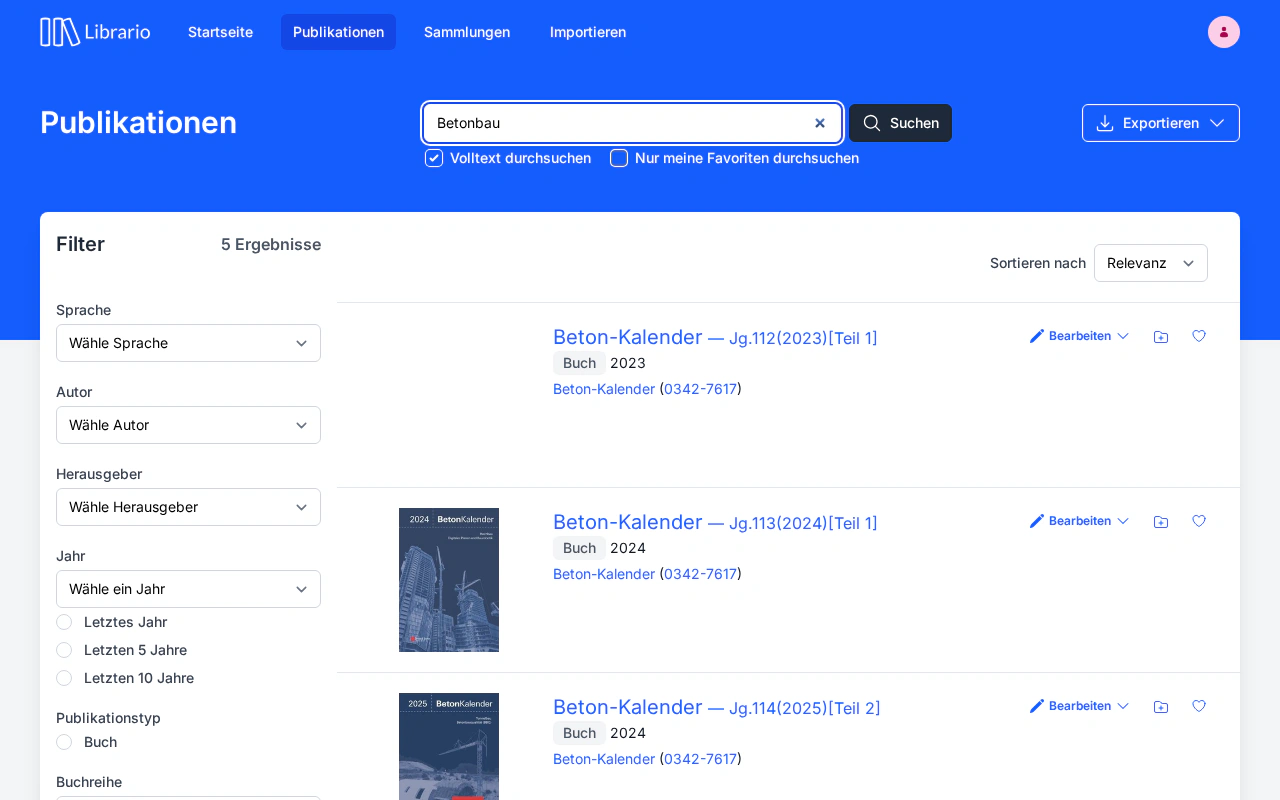
Librario search results with full-text hits and highlighted word parts: a search for “Stahlbetonverbundbalken” (steel-concrete composite beam) finds hits for Stahl, Beton, Verbund and Balken (steel, concrete, composite, beam)
Screenshot of the German interface.

The situation

Search time is working time, and it costs more than most people think

A new standard has to be referenced. Someone opens the shared drive, scrolls through folders, tries different search terms, finds nothing and asks a colleague who is on the phone. Twenty minutes later the publication is on the desk. That was not an exception.

According to McKinsey’s widely cited 2012 study on the social economy, knowledge workers spend an average of 19% of their working time searching for and gathering information. Even if only a fraction of that goes on technical literature, it ties up a full-time post in a team of 30 engineers or researchers: a post that moves no project forward and does nothing but search.

This applies all the more to technical literature: PDFs are closed documents. If what you are looking for is not in the title, a file explorer simply won’t find it. The three pages on fire safety concepts that matter sit in a 2008 yearbook, and nobody knows. Researchers know another version of this: the source from a dossier three years ago has to be found again for the periodic update.

What the numbers show

typical time for a manual search across shelves, shared drives and email enquiries. The ROI calculator works out with your own figures what shorter search times add up to over a year.
20 minutes
of working time goes on searching for and gathering information, almost one working day a week (source: McKinsey Global Institute, 2012)
19%
Historical sources often have no exact date. Librario also filters holdings where only the publication year is known. No yearbook and no expert report disappears in the archive.
The year is enough

What makes German hard

Search German without splitting compound words, and you miss half of it

Most search tools were built for English. English words are short and stand apart, joined by spaces. A search for “steel concrete” finds “steel” and “concrete”, no problem.

German works differently. “Stahlbetonverbundbalken” is a single word, made up of Stahl·beton·verbund·balken (steel, concrete, composite, beam). An index-based search without a German language analyser does not know that “Beton” (concrete) is in there. The same goes for “Tragwerksplanung” (structural design), “Brandschutzkonzept” (fire safety concept), “Stahlbetondecke” (reinforced concrete slab) and “Bauwerksprüfung” (structural inspection): dozens of technical terms that engineering firms and research departments search for every day.

The result: if you run a conventional document archive or an international integrated library system (ILS) without a German language analyser, your search results are systematically incomplete, and you never notice. The publication is there. The hit still does not appear.
The solution

Four layers that together open up your holdings

  • Full text across your PDFs

    Librario indexes not just titles and contributors but the entire content of your PDF files: body text, tables, footnotes. A search for “Bauen im Bestand” (work on existing buildings) finds the relevant chapter, even when the book is called “Konstruktionslehre” (building construction). You can fill Collections straight from the search results.
  • Language analysis that understands German

    Librario’s compound analyser splits technical compound words into their parts automatically: “Stahlbetonverbundbalken” → Stahl · beton · verbund · balken. Stemming matches singular and plural. Librario indexes English, French, Italian and Spanish with their own language analysers: German is the stress test, not the limit.
  • Ten filters you can combine

    Publication type, author, language, editor, category: you can combine ten filters to narrow hundreds of hits down to the one that matters. Put an exact word sequence in quotation marks to search it as a phrase, for example “Bauen im Bestand”. All in an interface that works without training.
  • Year filter for historical literature

    Projects on existing buildings and basic research need to narrow literature down by publication year. Librario offers fixed periods (last year, last five, last ten years) and filters on any single publication year, including the oldest in your holdings. Librario also records imprecise publication dates (year only, or year and month) in the EDTF standard and makes them filterable. You sort hits by relevance or chronologically, back to the oldest volumes in your holdings.

In detail

How Librario’s search is built

01 · FULL-TEXT INDEX

Up to 200 MB per file, every chapter searchable

When you upload a PDF, Librario extracts the whole text and adds it to the search index. By default Librario searches the metadata; you add the full text with Search full text. Results are sorted by relevance, or chronologically if you prefer. Scanned documents need a text layer; the documentation shows how to add one.

02 · COMPOUND SPLITTING

Stahlbetonverbundbalken → Stahl · beton · verbund · balken

Librario sets up German compound splitting (decompounding) out of the box. A search for “Beton” also finds “Stahlbetonverbundbalken”, “Betondecke” (concrete slab) and “Betonfertigteil” (precast concrete element). In international standard configurations, that is a customisation project of its own; in Librario it comes as standard.

03 · TEN FILTERS

Precision instead of noise

Publication type (standard, book, article, thesis), author, editor, organisation, language, year, category, series, journal, files: all filters combine. Too many hits? Narrow them down. Too few? Loosen a filter. And a DOI, arXiv or PubMed ID in the search field answers the question straight away: do we already have this in our holdings?

04 · CONTRIBUTOR SEARCH

Know the name, find the works

When someone types the name of an author or editor, Librario recognises what they are looking for and suggests filtering by that person. The newest publications come first, which helps when you follow the current work of a research group. Add a year, such as “Müller 2019”, and Librario suggests that person’s works from that year.

Applied to your organisation:

How much research time do you save?

Research time per year

—

Calculate the full business case →

Your specialist literature has answers. Librario finds them.

See in a demo how Librario finds “Stahlbetonverbundbalken” in seconds, right down to the chapter in your PDFs, and how the year filter reaches the oldest volumes in your holdings.